
An engineer calls you. She received your drone deliverables — a beautiful elevation model, contour lines every half-meter, looks great in QGIS. Then she loads it into her grading software and the contours run across rooftops. Trees show up as 40-foot hills. Her cut-fill volumes are off by thousands of cubic yards. She’s not happy.
You sent her a DSM when she needed a DTM. And if you don’t know the difference between those two things — or you think “DEM” covers it — you’re going to make this mistake more than once.
These three acronyms are the most-asked, most poorly-answered question in drone mapping. The definitions are simple. The confusion is real. And which product you deliver determines whether your client gets usable data or an expensive raster image of tree canopies.
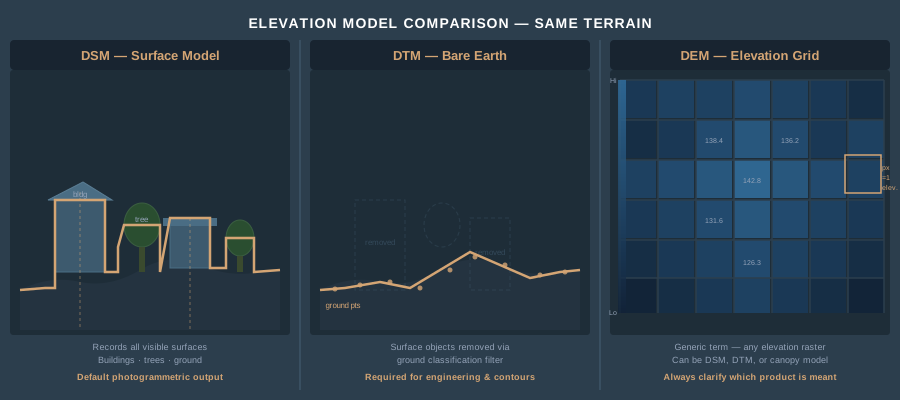
The Definitions — Once and For All
DEM (Digital Elevation Model) is the umbrella term. Any raster grid where each pixel stores an elevation value is a DEM. That’s it. A DEM can represent the bare ground, the top of the canopy, or anything in between — the term alone doesn’t tell you which.
Here’s where it gets confusing. The USGS defines DEM as bare-earth elevation specifically — their 3DEP products are ground-surface models they call DEMs. Much of the international GIS community uses DEM as the generic container term for any elevation raster. Same acronym, different meaning depending on who’s talking. When a client asks for “a DEM,” you need to ask what they actually mean.
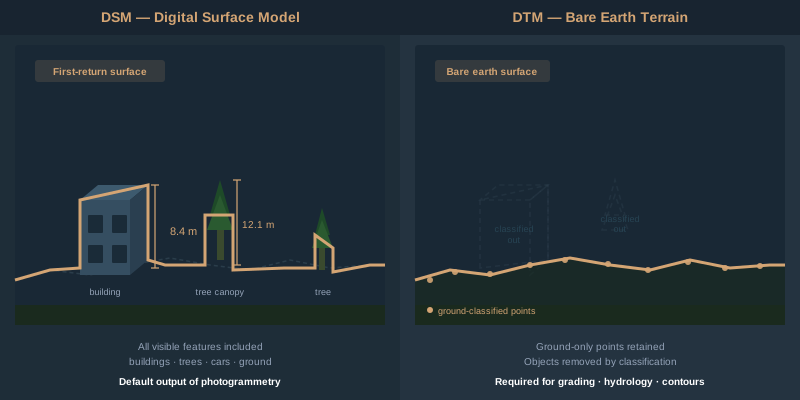
DSM (Digital Surface Model) represents the first return — the highest thing the sensor sees. Buildings, trees, vehicles, power lines, the ground where nothing else sits above it. Fly a drone over a neighborhood and the DSM gives you rooftop elevations, canopy tops, and bare ground in the open areas. It’s what photogrammetry produces by default. Every point in your dense cloud contributes to the DSM because the camera sees the top of everything.
DTM (Digital Terrain Model) represents the bare earth — vegetation stripped, structures removed, just the ground surface. This is what engineers need for grading plans, what hydrologists need for flood modeling, what surveyors need for contour generation. Getting from a DSM to a DTM requires ground classification — algorithmically identifying which points in your point cloud are actual ground versus vegetation, buildings, or noise.
To put it plainly: the DSM is what you see. The DTM is what’s underneath it.
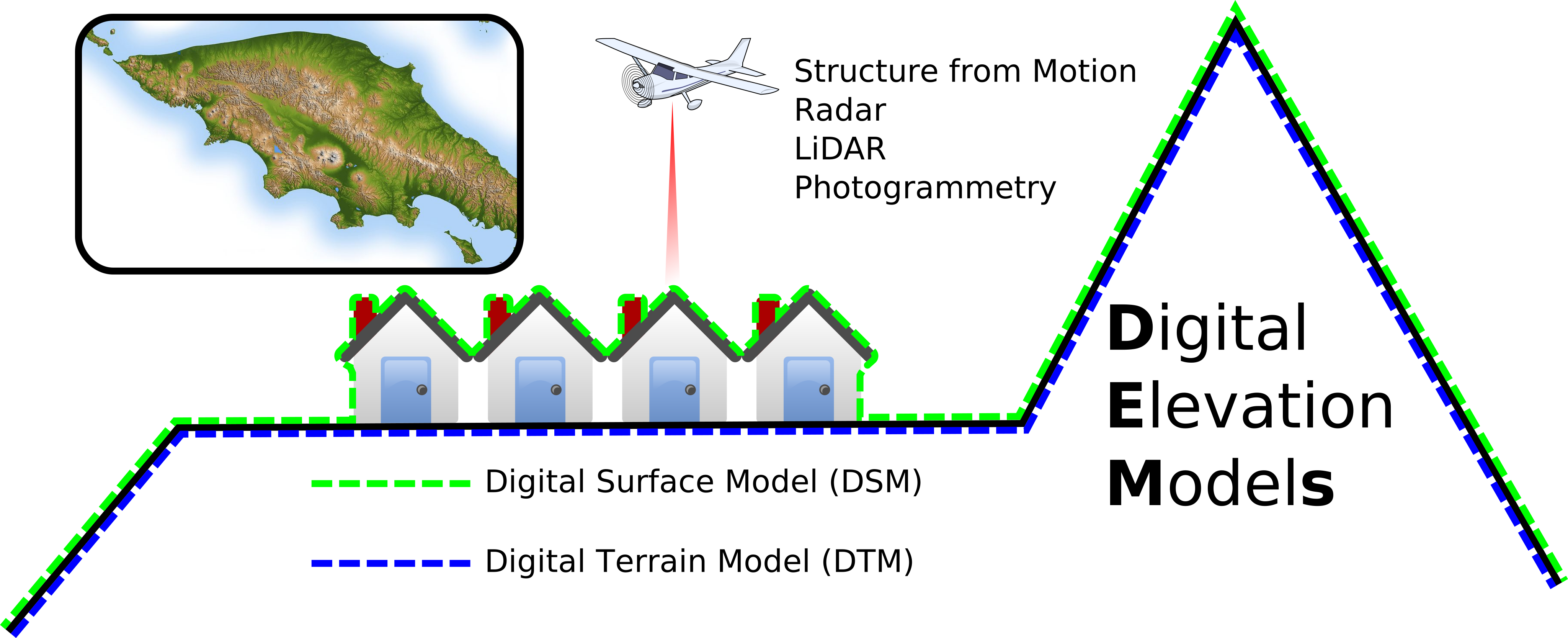 Arbeck, via Wikimedia Commons, CC BY 4.0
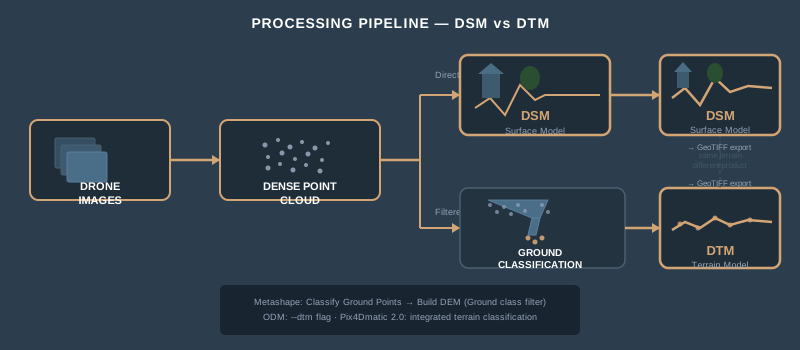
How Each Product Is Derived from Drone Data
DSM: The Default Output
When you process drone imagery through photogrammetry software — Metashape, Pix4D, WebODM, RealityCapture — the dense point cloud represents every visible surface. The software interpolates those points into a regular grid. That grid is your DSM.
No classification required. No filtering. The DSM is the direct product of structure-from-motion photogrammetry. Fly, process, export. Every pixel reflects whatever was on top at the time of flight.
Resolution depends on flight altitude and camera. A typical mapping flight at 120 meters AGL with a 20-megapixel sensor produces a DSM at 3–5 centimeters per pixel. At 60 meters, you’re looking at 1.5–2.5 centimeters. The numbers matter because your DSM resolution sets the ceiling for everything downstream.
DTM: The Processed Product
A DTM requires an extra step — ground classification. The software examines the dense point cloud and decides which points are ground and which are above-ground objects.
In Agisoft Metashape: Tools > Dense Cloud > Classify Ground Points. The algorithm divides the cloud into cells of a specified size, finds the lowest point in each cell, builds a triangulated surface from those low points, then iteratively adds points that fall within angle and distance thresholds. Three parameters control the result — Max Angle (default 15 degrees), Max Distance (default 1 meter), and Cell Size (default 50 meters). After classification, build your DEM from source “Dense Cloud” with class filter set to “Ground” only.
In Pix4D: Pix4Dmatic 2.0 — released January 2026 — unified terrain classification and DTM generation into one workflow. Classify terrain points, generate the DTM, and create contours all within a single application. In older Pix4Dmapper workflows, you generate the point cloud, classify it using the built-in terrain filter or export to LAS and classify externally, then build the DTM from ground points only.
In OpenDroneMap (ODM): The --dtm flag triggers the SMRF (Simple Morphological Filter) algorithm during processing. ODM classifies ground points automatically and generates both DSM and DTM in a single run. Adjust --smrf-scalar, --smrf-slope, and --smrf-window parameters for terrain type.
External classification with LAStools: Export your dense cloud as LAS/LAZ. Run lasground or lasground_new — these implement progressive TIN densification, the same family of algorithms the photogrammetry tools use internally, but with more control. LAStools historically produced the best ground classification results on photogrammetric point clouds, with RMSE of 0.16 meters compared to 0.19–0.23 meters for in-software tools (Serifoglu Yilmaz et al., 2018, International Journal of Remote Sensing).
The catch: ground classification algorithms were designed for LiDAR data, not photogrammetric point clouds. LiDAR penetrates canopy gaps and returns points from the actual ground surface. Photogrammetry only sees what the camera sees — if the ground is occluded by dense vegetation, those ground points don’t exist in your cloud. No algorithm can classify what isn’t there.
This is the fundamental limitation. In open terrain or sparse vegetation, photogrammetric DTMs are excellent — 5–15 centimeters vertical accuracy. Under dense canopy, the DTM is an interpolated guess between the nearest visible ground points. If you need bare-earth elevation under heavy tree cover, you need LiDAR. Not a better algorithm. LiDAR. (For a deeper look at the tradeoffs, see LiDAR vs Photogrammetry — When to Use Each.)
The Terminology Problem
The terms are not standardized internationally. This creates real problems on deliverable contracts.
| Term | USGS Definition | International/Generic Definition |
|---|---|---|
| DEM | Bare-earth surface (= DTM) | Generic: any elevation raster |
| DTM | Bare earth + breaklines | Bare-earth surface |
| DSM | Top of all features | Top of all features |
In the United States, the USGS treats “DEM” and “bare earth” as synonymous — their 3DEP elevation products are ground-only surfaces labeled as DEMs. In Europe and much of the international GIS community, “DEM” is the umbrella term that includes both DSMs and DTMs.
When a client asks for “a DEM,” they might mean the bare ground (USGS convention), or they might mean any elevation surface (generic convention). When a forestry researcher says “DEM” in a paper, context determines whether they mean canopy-top or bare-earth.
The fix is simple: never deliver a “DEM” without specifying whether it’s a surface model or terrain model. Put it in the contract. Put it in the filename. site_DSM_2026-04-01.tif and site_DTM_2026-04-01.tif eliminate ambiguity. “DEM” alone is not specific enough for professional work.
When You Need Each Product
DSM — Use When Surface Features Matter
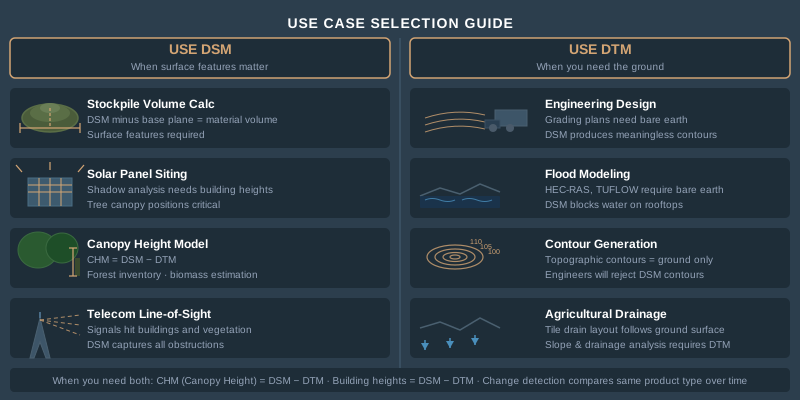
- Volumetric calculations of stockpiles. The material sits on top of the ground — you need the surface elevation, not bare earth. DSM minus a base plane gives you volume.
- Urban planning and line-of-sight analysis. Buildings and trees block views. The DSM tells you what’s actually in the way.
- Solar panel siting. Shadow analysis requires knowing building heights and tree canopy positions — all surface features.
- Canopy height modeling in forestry. DSM minus DTM gives you a Canopy Height Model (CHM). A forest inventory crew needs both products, but the DSM is what captures canopy tops.
- Telecom tower placement. Line-of-sight propagation modeling uses DSMs because signals hit buildings and vegetation, not bare ground.
DTM — Use When You Need the Ground
- Engineering design and grading plans. Civil engineers design to the ground surface. A DSM with 30-foot trees on it produces meaningless contours for earthwork.
- Cut-fill volume calculations for earthwork. Compare the existing ground (DTM) to the design surface. DSM inflates volumes by including vegetation.
- Flood modeling and hydrological analysis. Water flows on the ground, not on rooftops. Flood inundation models — HEC-RAS, TUFLOW, MIKE FLOOD — require bare-earth DTMs. A DSM would show water “blocked” by buildings and trees, producing nonsensical results.
- Contour generation for topographic surveys. Contour lines represent ground elevation. Contours derived from a DSM trace rooflines and treetops. Not what the surveyor ordered.
- Slope stability and geotechnical analysis. The ground surface determines slope angles and failure planes.
- Agricultural drainage design. Tile drain layout follows the ground surface, not the crop canopy.
Both — Use When You Need the Difference
- Canopy Height Model (CHM) = DSM - DTM. Standard forestry product for estimating timber volume, biomass, and forest structure.
- Building height extraction. DSM minus DTM in urban areas gives you structure heights for 3D city models and insurance assessments.
- Change detection. Compare multi-temporal DSMs for surface change (construction progress, erosion) or DTMs for ground-level change (subsidence, fill placement).
Accuracy: What to Expect
Accuracy varies by product type, terrain, vegetation, and flight parameters. Here are realistic numbers from photogrammetric drone surveys with GCPs.
| Product | Open Terrain RMSE | Moderate Vegetation RMSE | Dense Canopy RMSE |
|---|---|---|---|
| DSM | 2–5 cm vertical | 3–8 cm vertical | 5–15 cm vertical |
| DTM | 3–8 cm vertical | 10–25 cm vertical | 30–100+ cm vertical |
The DSM accuracy stays relatively stable because the camera always sees the top surface. DTM accuracy degrades as vegetation density increases because the ground points become sparse and interpolation error grows. Under dense forest canopy, photogrammetric DTM accuracy can exceed one meter of error — at that point, the DTM is unreliable for engineering or survey work.
Flight altitude matters. At 60 meters AGL, you’re generating a denser point cloud with more ground-visible points between vegetation gaps. At 120 meters, ground sampling distance doubles and you lose detail in partially occluded areas. For DTM-critical projects in vegetated terrain, fly lower.
GCP distribution matters more for DTMs than DSMs. Systematic vertical bias from poor GCP geometry affects the entire surface, but DTM errors compound with interpolation errors from sparse ground classification. Five well-distributed GCPs are the minimum for any elevation product delivery. (For how to read the vertical accuracy numbers your software reports, see the accuracy explainer.)
File Formats
| Format | Type | Use Case |
|---|---|---|
| GeoTIFF (.tif) | Raster | Standard delivery format for DSM and DTM. Single-band float32, embedded CRS and geotransform. Universal GIS compatibility. |
| LAS (.las) | Point Cloud | Classified point cloud with ground/non-ground labels. Full 3D data before rasterization. |
| LAZ (.laz) | Compressed Point Cloud | LAS compressed to 7–20% of original size. Industry standard for point cloud delivery and archival. |
| ASC (.asc) | ASCII Grid | Plain-text elevation grid. Human-readable, large file size. Legacy format still used by some hydraulic modeling software. |
| IMG (.img) | Raster | ERDAS Imagine format. Common in government and utility workflows. |
| XYZ (.xyz) | Text Points | Simple x,y,z text file. No metadata, no CRS. Avoid for professional delivery. |
For professional delivery: GeoTIFF for rasters, LAZ for point clouds. Include a metadata file specifying horizontal and vertical CRS, accuracy statement, GCP RMSE, classification method, and software version. The format is the easy part. The metadata is what separates professional deliverables from files on a hard drive.
How to Generate Each in Common Software
Agisoft Metashape Professional
- DSM: Workflow > Build DEM > Source: Dense Cloud > All classes. Default output. Export as GeoTIFF.
- DTM: Tools > Dense Cloud > Classify Ground Points (Max Angle: 15, Max Distance: 1.0, Cell Size: 50). Then Workflow > Build DEM > Source: Dense Cloud > Class filter: Ground. Export as GeoTIFF.
- Point Cloud: File > Export Points > LAS/LAZ format. Include classification attribute.
Pix4Dmapper / Pix4Dmatic
- DSM: Generated automatically during Step 3 (DSM, Orthomosaic, and Index). Export as GeoTIFF.
- DTM: In Pix4Dmatic 2.0, use integrated terrain classification. In older Pix4Dmapper, enable “Generate DTM” in processing options — applies noise filtering and surface smoothing to approximate bare earth. For better results, export point cloud as LAS and classify externally.
- Point Cloud: Export as LAS/LAZ from the quality report or rayCloud view.
OpenDroneMap / WebODM
- DSM: Default output. Located in
odm_dem/dsm.tifafter processing. - DTM: Add
--dtmflag (CLI) or enable DTM in WebODM task options. Uses SMRF filter for ground classification. Output atodm_dem/dtm.tif. - Point Cloud: Located in
odm_georeferencing/odm_georeferenced_model.laz.
Common Misconceptions
“The DSM is more accurate than the DTM.” Not exactly. The DSM has better vertical agreement with reality because it measures what’s visible. The DTM has additional uncertainty from ground classification and interpolation — but it represents the surface your client actually needs. Accuracy and fitness-for-purpose are different questions.
“My software automatically generates a DTM.” Some software labels its output as “DTM” when it’s actually a smoothed DSM. If you didn’t classify ground points or apply a terrain filter, you have a DSM — regardless of what the filename says. Check your workflow.
“I don’t need a DTM — I’ll just use the DSM for contours.” You’ll get contour lines that trace rooflines, tree canopies, and parked cars. An engineer will reject them immediately. Contours for topographic surveys come from DTMs. Always.
“DEM and DTM are the same thing.” They can be, depending on who you ask. In USGS convention, yes. In international practice, no. Clarify the terminology before you deliver.
“Photogrammetry can produce a DTM under heavy canopy.” It cannot. Photogrammetry reconstructs what the camera sees. If the camera can’t see the ground, the software interpolates — and interpolation under dense canopy produces errors measured in meters, not centimeters. For bare-earth models in forested areas, LiDAR is the correct tool.
Bottom Line
DSM, DTM, and DEM are not interchangeable terms — and the product you deliver determines whether your client can use the data. A DSM captures every surface feature and is the default photogrammetric output. A DTM represents bare earth and requires ground classification. DEM is an ambiguous umbrella term that needs qualification.
Know what your client needs before you fly. Specify the product in your contract. Name your files clearly. And if someone asks for “a DEM” — ask them which one.